


如何手动合并已拆分的 ZIP 压缩包?
如何打开 Z01 文件?
如何打开 haozip01.zip 文件?
如何禁用自动数据发送?
如何加密压缩包内的文件名?
如何从一个压缩包里只提取文件而不保留子文件夹?
如何把 Bandizip 项目从 Windows 11 的上下文菜单中移除?
如何从一个压缩包里只提取文件而不保留子文件夹?
当你解压一个如下所示的包含子文件夹中的文件的压缩包时,你可能会发现子文件夹的结构会被保留,并且解压的文件会被整理到同样的子文件夹中。
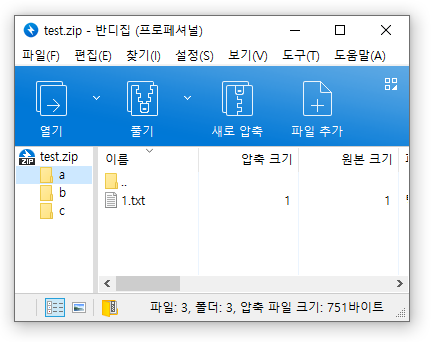
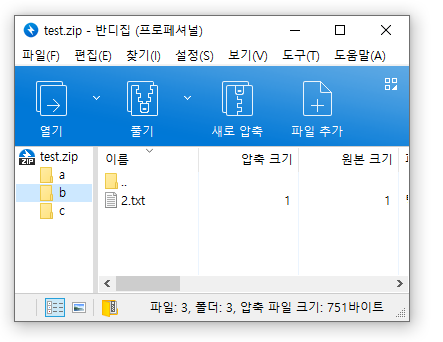
不过有时,你可能想要无视子文件夹,提取压缩包里的所有文件并且将他们放在一个文件夹中。在这样的情况下,请执行以下操作。
使用 Bandizip 中的“查找文件”功能
- 使用 Bandizip 打开一个压缩包。
- 按下 Ctrl+F 来打开“查找文件”窗口。
- 选择你想要解压的文件。
- 点击解压按钮或者拖放选择的文件到目标文件夹。
使用命令行参数
使用如下所述的“e”命令。
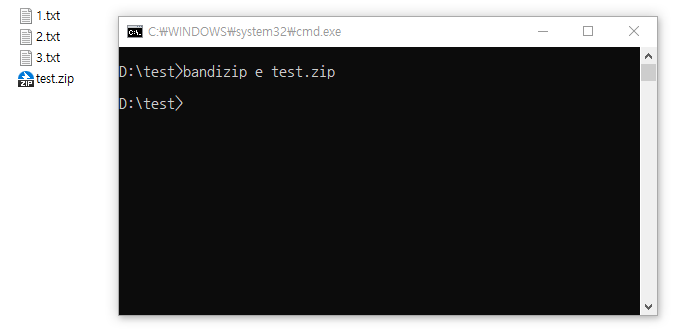
请访问以下链接来了解更多关于如何使用 Bandizip 的命令行参数的信息。
帮助 » 命令行参数